

Yes, online tutoring can be genuinely safe, but only when three things are locked in before the first lesson: a tutor who has passed real background checks, sessions and payments that stay inside the platform, and a privacy policy that spells out recording and data retention in plain terms. Skip any one of these and you're relying on luck. The checklist below tells you exactly what to ask and what to watch for.
TL;DR:
- Parents should verify that the platform conducts recent, comprehensive background checks and provides transparent proof of tutor qualifications before booking.
- Keeping lessons in shared family areas, using unique session links, and supervising early lessons help protect children during online tutoring sessions.
- Ask platforms detailed questions about default recording, data storage, encryption, and deletion policies to ensure data privacy and control.
- Moving communication off-platform or sharing personal information triggers serious safety concerns and warrants immediate intervention or stopping lessons.
- Continually review recordings, keep all messages within the platform, and have an ongoing checklist to maintain safety over the course of the tutoring relationship.
Table of Contents
- How to vet an online tutor before you book
- Session rules that protect children during lessons
- Privacy, data and recordings: exact questions to ask the platform or tutor
- Red flags: when to pause or stop using a tutor or platform
- A practical checklist parents can use before and during the first month
- Platform safety controls parents should expect
- Guidelines for protecting children from online grooming and inappropriate contact
- Legal considerations and compliance with child protection laws in online tutoring
- Emergency response protocols if a safety concern arises during a session
- A parent's short reflection on balancing oversight with trust
- How Tutoroo supports safer tutor discovery
- Sources
- FAQ
How to vet an online tutor before you book
Vetting starts with one blunt question: does the platform actually run criminal-background checks, or does it just say "verified" on a profile badge? Ask what the check covers, who conducts it, and how recently it was done. A tutor who's been active for three years on a stale check from their sign-up date isn't verified in any meaningful sense.
Beyond background checks, ask for proof you can see with your own eyes.
- ID verification that matches the name on the profile
- Teaching certificates or qualifications relevant to the subject
- At least one contactable reference from a previous student or parent
- A short recorded sample lesson, if the platform offers one
Reputable providers publish their vetting process rather than burying it in marketing copy. Real security practice reads like documentation, not a slogan, so if a platform's answer to "how do you check tutors" is a vague line about "bank-level security," treat that as a non-answer. Tutoroo's own tutor registration process requires profile detail and verification steps before a tutor can list lessons, which gives you something concrete to check rather than a promise to trust.
If you're hiring privately rather than through a marketplace, insist on a written reference and treat the first lesson as a monitored trial. For a fuller breakdown of what a proper check actually includes, this tutor background check guide is worth five minutes of your time.
Session rules that protect children during lessons
Where your child sits for a lesson matters as much as who's teaching it. A shared family space, not a bedroom with the door closed, removes most of the risk in one move.
- Position the camera so it shows only the child and the immediate learning area, not the rest of the house.
- Use unique, single-use session links with waiting-room controls so nobody can join without approval.
- Agree with the tutor on lesson structure and behaviour expectations before the first session, not after something feels off.
- Have a plan for switching tutors quickly if the personality fit isn't right, without treating it as a confrontation.
Pro Tip: Sit within earshot for the first two or three lessons, even if you don't watch the whole thing. You'll pick up on tone and teaching style faster than any profile review could tell you, and the tutor will know a parent is nearby.
Clear expectations also protect the relationship, not just the child. Our guide to tutor-client communication covers how to set boundaries without making a good tutor feel distrusted from day one.
Privacy, data and recordings: exact questions to ask the platform or tutor
Most tutoring platforms record lessons by default, and PC Tech Magazine's reporting on tutoring platforms and student data recommends parents get specific answers before assuming that's fine. "Secure" means nothing on its own. Push for detail.
- Is recording switched on by default, and can you opt out per lesson or per student?
- Who exactly can access recordings, by role, and how long are they kept before deletion?
- Where is data stored, is it encrypted at rest, and will the provider name its third-party processors for video, transcription or payments?
- What happens to your data if you leave the platform, and is deletion automatic or something you have to chase up?
The US Department of Education's guidance on third-party educational services is clear that providers handling data on minors should minimise what they collect and be upfront about consent. If a platform can't answer these questions in specific terms, that's your answer about whether to proceed. Providers that let you set opt-in or opt-out recording per student, with a stated deletion timeline, are giving you real control, not a reassurance.
Red flags: when to pause or stop using a tutor or platform
Some signals warrant an immediate pause, not a wait-and-see approach.
- The tutor asks to move chats, calls or payments to WhatsApp, text, or direct bank transfer.
- Answers about background checks, recording storage, or data retention stay vague no matter how directly you ask.
- Requests for personal photos, home address, social media details, or anything that sidesteps parental oversight.
Moving communication off-platform is one of the clearest warning signs in online safety generally. The FBI's guidance on common scams treats requests to shift contact away from a monitored channel as high-risk behaviour, and the same logic applies directly to tutoring. If it happens once, address it. If it happens twice, stop the lessons and report it to the platform.
A practical checklist parents can use before and during the first month
Spread the effort across three stages rather than trying to check everything at once.
- Before booking: confirm the vetting process, read the privacy policy in full, and ask specifically about recording defaults and retention windows.
- At the first lesson: supervise from a shared space, verify the session link is unique to that booking, and check the camera framing and lesson plan match what was agreed.
- Ongoing: review recordings when available, keep every message inside the platform, and schedule a monthly check-in on progress and comfort level.
This staged approach matters more than any single check. Our piece on parental involvement in tutoring goes deeper into what "ongoing" oversight looks like without hovering over every session.
Platform safety controls parents should expect
Good platforms document their controls instead of asserting them. Look for named infrastructure providers, stated encryption standards, role-based access to recordings, and an actual incident response contact, not just a "trust and safety" page with no specifics.
A provider that lists its infrastructure partners, encryption in transit and at rest, and a clear incident response process is showing its work. One that only repeats "bank-level security" is asking you to take its word for it.
UNESCO's technical guide for online education platforms recommends encryption, role-based access and privacy-by-design as baseline expectations, not premium features. Some published platform security pages model what full disclosure looks like: named hosting providers, backup schedules, and documented access controls. Use that as your benchmark when comparing what a tutoring provider actually publishes against what it merely claims.
Guidelines for protecting children from online grooming and inappropriate contact
Grooming behaviour online rarely announces itself. It tends to build gradually through flattery, private jokes, or requests framed as harmless, like asking a child to keep a conversation "between us."
Teach your child three habits before their first lesson: never share personal details like a home address or school name in chat, never agree to move the conversation to another app or platform, and always tell a parent if a tutor says anything that feels confusing or asks them to keep a secret. These aren't abstract rules. They're the specific behaviours that let a child recognise a problem before it escalates.
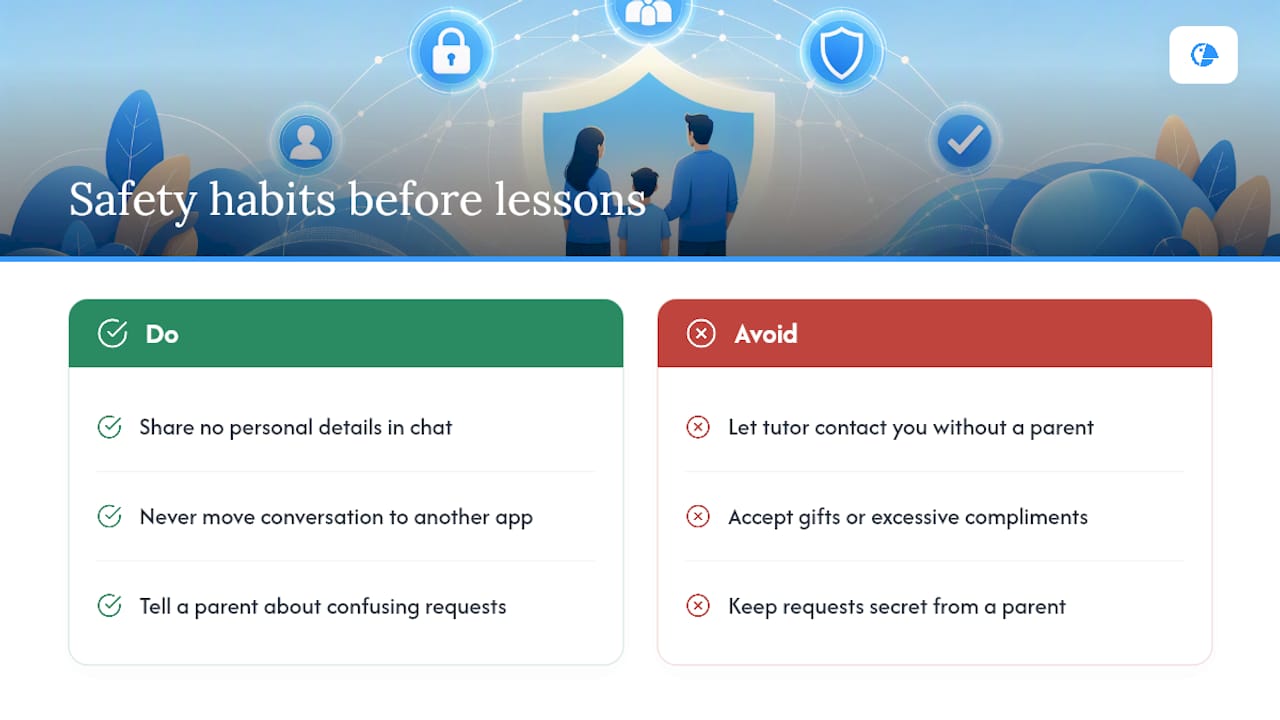
UNESCO's guidance on digital citizenship points out that children who understand these boundaries in advance are far more likely to report discomfort rather than freeze or stay quiet. That's the real value of the conversation. It's not about scaring your child, it's about giving them language for something that might otherwise feel too awkward to mention.
Watch, too, for tutors who push to build rapport outside the lesson itself, through gifts, excessive compliments, or attempts to contact your child directly rather than through you. A professional tutor keeps the relationship focused on the lesson and communicates with the parent, not around them.
Legal considerations and compliance with child protection laws in online tutoring
Platforms operating in the United States that handle data belonging to minors carry real obligations, not just best-practice suggestions. The Department of Education's guidance on third-party educational services sets out that providers should minimise the data they collect from children and seek appropriate consent, particularly where a school or district has facilitated the service.
For families booking directly rather than through a school, the practical question is simpler: does the platform's privacy policy actually name what it collects, why, and for how long? A policy that reads like a legal shield rather than a plain explanation is worth a second look. You don't need to be a lawyer to spot the difference between a document written to inform you and one written to protect the company.
Compliance isn't a guarantee of safety on its own, but it is a floor. A platform that takes data-minimisation and consent seriously enough to document it is more likely to have thought through the harder questions, like who can access a recording of your child, than one that hasn't.
Emergency response protocols if a safety concern arises during a session
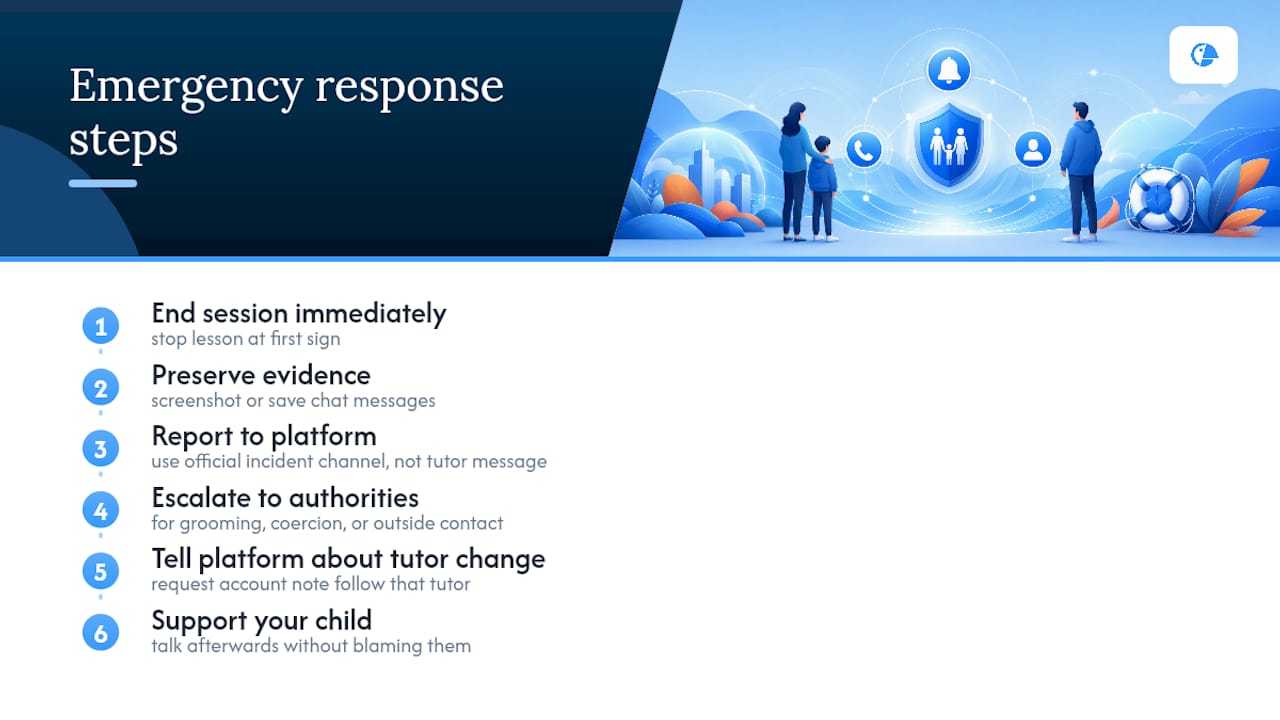
Know what you'll do before you need to do it. If something happens mid-lesson, whether it's inappropriate language, an uncomfortable request, or a tutor behaving unprofessionally, end the session immediately rather than waiting to see how it unfolds.
After ending the lesson, report the incident through the platform's official channel, not just a message to the tutor. Reputable providers keep an incident response contact for exactly this reason, and using it creates a record that protects other families too. Screenshot or save any chat messages before they can be edited or deleted.
If the concern involves anything that suggests grooming, coercion, or contact attempts outside the platform, treat it as a matter for the relevant authorities, not just customer support. The FBI's guidance on scams and unsafe online contact is a useful starting point for understanding when a concern has moved beyond a platform dispute. Talk to your child afterwards without making them feel blamed, and let the platform know you're switching tutors so the account note follows that tutor, not just your booking.
A parent's short reflection on balancing oversight with trust
Supervision and trust aren't opposites, they work together. Sitting nearby for early lessons isn't spying, it's how you learn whether a tutor is good at their job. Once you've seen a few sessions run well, you can step back without stepping away completely.
Safety here isn't one big decision made at sign-up. It's a handful of small, consistent habits, on the platform's side and yours, that add up over the month.
— TUTOROO
How Tutoroo supports safer tutor discovery
Finding a tutor shouldn't mean choosing between convenience and caution. Tutoroo connects families with tutors through in-platform messaging and profile detail you can actually check, including qualifications, availability and reviews, before you commit to a lesson. Every tutor manages their own profile through a registration process, which gives you something concrete to look at rather than a cold introduction.
Browsing a specific language page, like the Malay tutor listings, shows you the kind of detail worth expecting: teaching background, location or availability for online sessions, and a way to message directly before booking anything. Before you commit to any tutor, check their published vetting steps and ask directly about recording and privacy settings, on Tutoroo or anywhere else. If a family member's device security is also on your mind, resources like AmmarAI's guidance for students are worth a look for keeping study accounts and schoolwork protected. Start by browsing tutors on a platform and send a message before you book.
Sources
- Protecting student privacy while using online educational services — US Dept. of Education
- Online tutoring and student data: What parents should ask before signing up — PC Tech Magazine
- Personal data security technical guide for online education platforms — UNESCO IITE
- Tutorbase — Security
FAQ
What are the disadvantages of online tutoring?
The main risks are reduced parental visibility compared with in-person lessons, reliance on the platform's own vetting and data practices, and the possibility of technical issues disrupting a session. None of these are reasons to avoid online tutoring, but they are reasons to check a provider's controls before booking.
What are the 4 C's of online safety?
The 4 C's commonly used in online safety education are content, contact, conduct and commerce, covering what a child encounters, who they interact with, how they behave online, and the financial risks they might face. Applied to tutoring, this means checking lesson content, verifying who's actually teaching, setting behaviour expectations, and keeping all payments on-platform.
What are the 5 online safety rules for tutoring sessions?
A practical five are: keep the camera on a shared family space, use unique session links with waiting-room controls, never move payments or chats off-platform, verify tutor background checks before booking, and confirm recording and data-retention settings in writing.
What are important online safety tips for students during tutoring?
Students should never share their address, school name or personal photos in chat, should tell a parent immediately if a tutor asks them to keep something secret, and should always use the platform's own messaging and video tools rather than a personal app the tutor suggests.
Is online tutoring safe for younger children specifically?
Online tutoring can be safe for younger children when a parent supervises from a shared space, session recordings are reviewable, and the tutor has passed a documented background check. Platforms like Tutoroo that keep messaging and profile details visible make that supervision easier to maintain.